Microsoft 365 Went Down for 12+ Hours: The Small-Team Outage Checklist (2026)
A global Microsoft 365 outage knocked out Outlook and Teams for 12+ hours. What it costs a small team ??and the checklist that keeps you working.
By Bongyeon Kim · Researched from primary sources, verified by hand, and produced with AI assistance on a production stack this site actually operates (Vercel · Neon · Cloudflare R2).
Sometime before 1 p.m. ET on Thursday, November 12, 2026, Outlook stopped loading mailboxes for a large share of Microsoft 365 users. Within the hour, Downdetector says reports had spread to 74 countries and territories. Teams wouldn't connect. SharePoint, Copilot, and a chunk of the Microsoft 365 suite went with them. City governments in the US reported widespread email failures, courts lost live feeds, airlines flagged email support disruptions, and banks across multiple countries were hit ??per CNN's live coverage. Reuters put the outage at roughly 12 hours and still counting as it rolled into Asia-Pacific business hours and then into a second day.
If your team runs on Microsoft 365 ??which is most teams ??you spent Thursday afternoon, Thursday night, and part of Friday discovering exactly how much of your company is one SaaS login.
TL;DR
- A global Microsoft 365 outage on Nov 12, 2026 degraded Outlook/Exchange Online, Teams, SharePoint, Copilot and other 365 services for 12+ hours across 74 countries, and was still resolving at publication time.
- Microsoft's status page tracked it as incident EX1550543 (Exchange Online mailbox connectivity) plus MO1550821 (multiple 365 services), with a separate, earlier Teams incident (TM1550488) in the Americas.
- Microsoft's stated cause so far: a subset of servers became unexpectedly unavailable, pushing elevated load onto remaining infrastructure. Not a cyberattack, per the company. Full root cause is promised in a post-incident report.
- Recovery was slow: deployments frozen, traffic rerouted, servers restarted, patches verified ??Microsoft's own word for progress by Friday was "marginal success."
- The bill for a 12-hour outage at a small company is plausibly thousands to tens of thousands of dollars in lost output alone (illustrative model below).
- The fix isn't buying a second cloud. It's an afternoon of prep: offline copies, a second communication channel, desktop app fallbacks, and agreed RTO/RPO numbers.
The incident, as reported
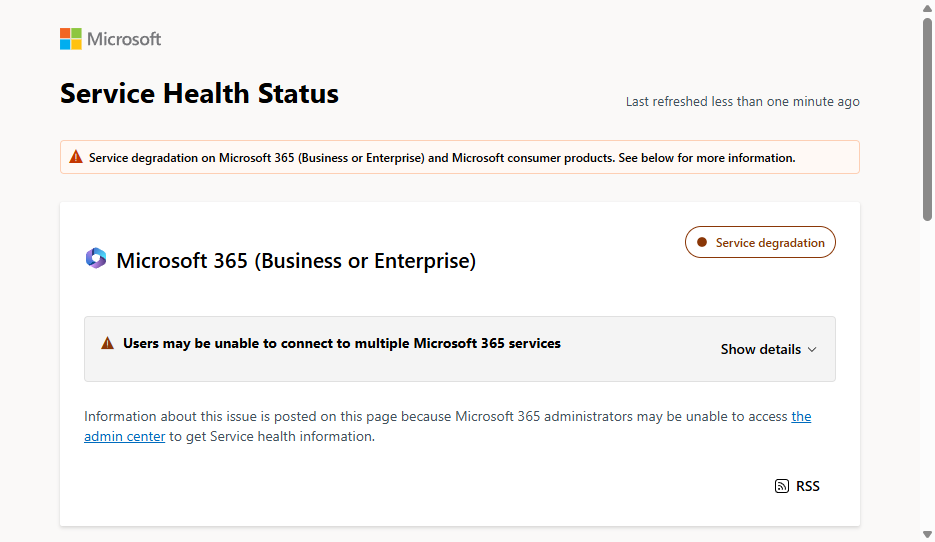
The timeline from Microsoft's own status updates and the @MSFT365Status account reads like this:
- Earlier Thursday ??a Teams incident (TM1550488) affecting North and South America was reported and marked resolved. Microsoft has not said it's connected to what followed.
- 11:17 a.m. ET ??incident EX1550543 opened: "Users may be unable to connect to their mailboxes in Exchange Online through multiple connection methods."
- 1:26 p.m. ET ??incident MO1550821 opened for the broader suite: "Users may be unable to connect to multiple Microsoft 365 services." That's the one that swept in Teams, SharePoint Online, Copilot, and Defender XDR alongside mail.
- ~1 p.m. ET onward ??Microsoft publicly acknowledged the failures, first in the Americas, then expanded to "any region."
- Mid-afternoon ??status updates identified "elevated load" across multi-region infrastructure and began moving connection traffic across Microsoft's global backbone.
- Later ??all environment deployments were frozen, traffic was rerouted away from degraded nodes, and affected servers were restarted. A status update clarified the elevated load wasn't an external traffic spike: it was "caused by servers being unexpectedly unavailable." Another noted the affected servers were failing automated health checks while a configuration test ran alongside fleet restarts.
- Friday, Nov 13 ??Microsoft's update said it was seeing "marginal success," with teams reviewing server performance across regions and confirming patches applied and working as intended after infrastructure reboots. The company said it wasn't aware of any malicious activity behind the incident and committed to a full post-incident root-cause report after mitigation.
Status as of writing (Nov 13, 2026): resolving. Both incidents were still listed as active service degradations into Friday, with Microsoft saying it would "continue to treat this incident with urgency and priority until full resolution." Check the live status page before you plan around anything here ??the final state and the official root cause may both have changed since this was written.
Two things worth noting about the response. First, mitigation was slow not because engineers were idle but because the failure mode was nasty: servers dying caused the load that made things worse, which is a classic cascade. Second, the communication channel people actually relied on was X posts and third-party trackers ??because the status information lived inside admin centers and status pages that many users could still reach, but their mailbox couldn't, and Teams couldn't. When your outage notification system is part of the outage, your runbook needs a plan for that.
What a 12-hour outage actually costs
Nobody has published a verified dollar figure for this event yet, so treat the following as what it is: an illustrative model, not reported numbers. The point is the shape of the math, which you can run for your own team in five minutes.
Assumptions: a 12-person company, average fully-loaded cost of $60/hour per person, 12-hour outage, and ??realistically ??nobody is 100% blocked for 12 hours. People context-switch, work around, take meetings that don't need Teams. But they also burn time thrashing: retrying, asking "is it just me?", improvising workarounds.
| Impact layer | Assumption | Cost |
|---|---|---|
| Direct blocked hours | 12 people × 6 effective lost hours × $60/hr | $4,320 |
| Thrash overhead | 12 people × 2 hrs of retry/coordinate chaos × $60/hr | $1,440 |
| Missed deadlines / deliverables | 1 deal or delivery slipped by a day | $500??5,000 |
| Recovery catch-up | Overtime / weekend work to clear the backlog | $1,000+ |
| Illustrative total | $7,000??12,000 per 12 hours |
Scale that by headcount and it gets ugly fast: the same model at 100 people lands near $60,000??100,000 in lost output alone. And none of it includes revenue-side hits ??a sales proposal that sat in a dead Outbox, an invoice that didn't go out, a customer who needed an answer within the hour and got silence instead. For a small business, the single biggest line item usually isn't the lost hours. It's the one commitment the outage broke.
One more angle: email and chat aren't just tools, they're the record. During the outage, mail sat in outboxes and messages simply didn't send ??which means agreements, approvals, and threads were silently delayed, not just conversations. That's why an alternate channel (below) matters even for teams that feel "not that dependent" on Microsoft.
The small-team outage checklist
This is the part you can actually do something about, and it fits in one afternoon:
- Keep offline copies of what matters. The current version of every active document, your last-known-good contact list, and critical templates synced locally ??OneDrive's local sync or a periodic export. If your docs are web-only and the web app is down, you have nothing. This is the desktop-app-versus-web-only question, and this outage is the answer: desktop Outlook with cached mail keeps reading (and queues sending); a browser tab with no connection does neither.
- Agree on an out-of-band communication channel ??before you need it. When Teams dies, you need somewhere that isn't Microsoft to say "Teams is down, do X." A group SMS/iMessage thread, a Slack workspace on a free tier, or even an emailed-to-personal-addresses list. One channel, written into your on-call notes, tested once. Cost: ~0.
- Know your fallbacks per service. Mail down ??phone calls and SMS still work. Meetings down ??a conference dial-in that runs on someone's phone. Docs down ??the offline copies. Copilot down ??your brain, briefly. None of these are glamorous; all of them are free to arrange in advance and impossible to arrange mid-outage.
- Write down two numbers: RTO and RPO. Recovery Time Objective ??how long until you're working again (even in degraded mode). Recovery Point Objective ??how much data loss you can tolerate. For a SaaS outage, the honest answer for most small teams is "RTO: as fast as fallbacks engage, ~15 minutes" and "RPO: we don't own the data plane, so we accept provider-side loss risk ??our job is access, not durability." Saying that out loud kills the fantasy that a checklist means zero impact.
- Designate a human to watch the status page and broadcast. During the outage, the person checking status.cloud.microsoft and the @MSFT365Status account saved their colleagues hours of retry-looping. That role should be assigned, not emergent.
- Decide what you'd change afterwards. If a 12-hour outage broke a client commitment, that's a signal to change the commitment structure ??buffer days, alternate channels for anything client-facing, or a second provider for the one workflow that absolutely can't stop. You will not multi-cloud your whole stack over one outage; you shouldn't. Pick the one critical path and give it a plan B.
Total cost of this checklist: one afternoon and zero dollars. Compare against the model table above and the ROI is not a close call.
Even hyperscalers fail ??that's the sober part
It's tempting to read this as a Microsoft problem. It isn't. This is the second infrastructure-wobble story this blog has covered in the same week. In "A False Smoke Alarm Nearly Killed Jane Street's Datacenter: The Lessons (2026)," a false smoke alarm ??two safety systems, each working as designed, never checked against each other ??nearly drowned a trading firm's only NYC datacenter in sprinkler water. Different scale, different failure, same moral: the systems you depend on fail in ways nobody pre-authorized, and the teams that survive are the ones that decided in advance what they'd do, not the ones with better vendors.
Microsoft runs some of the most redundant infrastructure on the planet, and it still lost mailbox connectivity globally for the better part of a day because servers went unexpectedly unavailable and the remaining fleet got crushed by the load. "It's SaaS, it's someone else's reliability problem" was never a real position. The provider owns availability; you own continuity. Those are different jobs, and the second one is yours.
The bottom line for small teams
- The Nov 12, 2026 Microsoft 365 outage degraded Outlook, Teams, Copilot and more for 12+ hours across 74 countries and was still resolving a day later, with "marginal success" reported and a root-cause postmortem still pending.
- For a small team, a 12-hour outage plausibly costs $7,000??12,000 in lost output alone (illustrative model ??run it with your own numbers), and the real pain is usually the one broken commitment, not the hours.
- The countermeasure is cheap and unglamorous: offline copies, one non-Microsoft communication channel, desktop-app fallbacks over web-only, a named status-watcher, and explicit RTO/RPO numbers agreed before the next status page goes orange.
Sources
- Microsoft 365 service status & @MSFT365Status updates: status.cloud.microsoft / x.com/MSFT365Status
- CNN, "Global Microsoft outage leaves millions without access to Outlook email, Teams and other tools" (live updates, Nov 12??3, 2026): cnn.com
- Reuters, "Microsoft outage spills into Asia-Pacific business hours" (Nov 12, 2026): reuters.com